Table of Contents
Export to Excel using Open XML
Hello folks, Today I am going to explain regarding Export to Excel using Open XML. We could do this in both asp.net and Windows application as well as in WPF.
Step 1: Download below libraries:
Step 2 : Source code for Export to excel using Open XML:
using System;
using System.Data;
using ClosedXML.Excel;

namespace ExportToExcleUsingOpenXML
{
    class Program
    {
        static void Main(string[] args)
        {
            string strFilePath=AppDomain.CurrentDomain.BaseDirectory+"\\export-excel-using-open-xml.xlsx";
            using (XLWorkbook wb = new XLWorkbook())
            {
                wb.Worksheets.Add(DataTableWithData(), "Employee");
                wb.SaveAs(strFilePath);
            }
        }

        private static DataTable DataTableWithData()
        {
            DataTable dt = new DataTable("Employee");
            dt.Columns.Add("EmployeeId", typeof(Int32));
            dt.Columns.Add("EmployeeName", typeof(string));
            dt.Columns.Add("Address", typeof(string));
            dt.Columns.Add("MobileNo", typeof(string));

            dt.Rows.Add(1, "E1", "A1", "0000000000");
            dt.Rows.Add(2, "E2", "A2", "111111111");
            dt.Rows.Add(3, "E3", "A3", "1222222222");
            dt.Rows.Add(4, "E4", "A4", "3333333333");
            return dt;
        }
    }
}
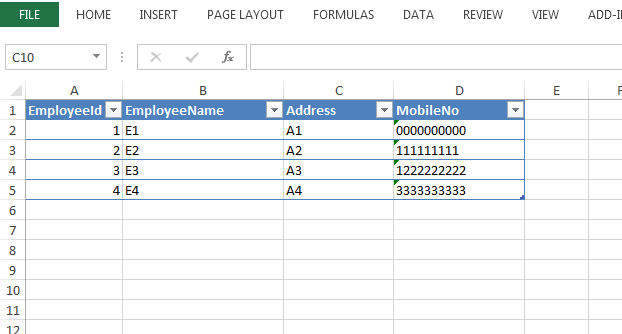
That all, We could achieve this task withing two simple steps. Finally we could get below output in excel.